qotm in your terminal.
Everything the command does, from the first quote to submitting your own. It reads a local copy of the curated dataset, so the default path needs no account and no network.
npm i -g qotmNode 22.16+ or 24 · macOS, Linux, Windows · MIT · source on GitHub
01 · Install: One command, then it’s yours.
qotm needs Node.js 22.16 or later, or 24. It installs as one file with nothing to build, and ships with a copy of the curated dataset, so the first quote works offline.
$ npm i -g qotm  # pnpm and bun work too
$ qotm  # your first quote
Upgrading from qotm 1.x? The same command installs 2.0, a rewrite: the commands below replace the old ones.
02 · Every new terminal: A thought between commands.
Add one line to your shell’s startup file and every new terminal opens with a quote. It reads the local copy, so it costs no network and no wait, and it avoids the last 50 you saw.
- zsh, at the end of ~/.zshrc
command -v qotm >/dev/null && qotm- bash, at the end of ~/.bashrc
[[ $- == *i* ]] && command -v qotm >/dev/null && qotm- fish, at the end of ~/.config/fish/config.fish
status is-interactive; and type -q qotm; and qotm- PowerShell, at the end of $PROFILE
if (Get-Command qotm -ErrorAction SilentlyContinue) { qotm }
The guard skips it where qotm isn’t installed, so the line is safe in shared dotfiles. Prefer it quieter? qotm config set style slab draws a lighter panel, and --plain prints just the words.
03 · On your GitHub profile: A quote on your profile, too.
qotm.dev/today.svg is the quote of the moment as an image, drawn the way qotm draws it. Put it in your profile README and it changes every day, no action needed.
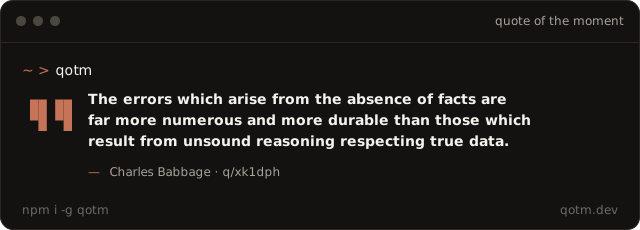
[](https://qotm.dev)On a light profile, ?theme=light draws it on paper. GitHub keeps a copy of images and checks for a new one every hour, so the change can show up a little after midnight UTC.
04 · Reading quotes: Narrow it down, or go back.
qotm- A quote you haven’t seen lately.
qotm --topic debugging- From one topic. The slugs are on qotm.dev/topics.
qotm --author dijkstra- By one author.
qotm --source- With where it comes from: the work, the year, the link.
qotm last- The previous quote again.
qotm open- Its page on qotm.dev: the source, the context, who checked it.
qotm search complexity- Search your copy, offline.
--websearches qotm.dev.
05 · Favorites: Keep the ones that stay with you.
Favorites and private quotes live on this machine and work offline. Sign in and they follow you: a save goes up straight away, and favorites from qotm.dev come down with the next sync.
$ qotm save  # the quote you just saw
$ qotm favorites  # list them
$ qotm --favorites  # a quote from them
$ qotm add "Name things twice." --author Ada  # a private quote
06 · Staying current: New quotes arrive in releases.
Curators publish a dataset release when a batch of quotes has been checked. qotm sync fetches the latest; your copy never changes behind your back.
$ qotm sync
synced v2026.11.1: 540 quotes
(+41 new, ~2 corrected, −3 withdrawn)- Checked against the release’s size and sha256 before it’s used.
- Swapped in one step: an interrupted download changes nothing.
- Already current? One small request, nothing downloaded.
07 · Your account: Sign in without a password.
An account syncs favorites and lets you submit. The terminal never sees a password: qotm login prints a code, and you approve it on qotm.dev, where you’re already signed in.
qotm login prints a code such as QTM-7F3K; approve it at qotm.dev/device.
qotm logout signs out and revokes this terminal; your local quotes and favorites stay. Every signed-in terminal is listed under Settings › Terminals.
08 · Submitting: Found one? Send it with its source.
Someone else’s words go to a verifier, who checks the source. Your own words get an originality check. Curators then pick what ships in the next release.
$ qotm submit \
  "Fancy algorithms are slow when n is small, and n is usually small." \
  --author "Rob Pike" --source "Notes on Programming in C" \
  --year 1989 --topic software-design
submitted q_3vd1k8 (submitted)
A verifier checks the source; you get an email when they have decided. https://qotm.dev/my-quotes--check- Only asks whether qotm has it already. Nothing is sent.
--original --rights- Your own words, credited to your handle.
qotm submit p_…- Turns one of your private quotes into an original.
09 · Settings & files: Four ways to draw a quote.
Pick one with qotm config set style, or try one once with --style. Piped output is always plain text: the words and the credit.
pull (the default)
▄▄ ▄▄  Software gets slower faster
▀█ ▀█  than hardware gets faster.

       —  Niklaus Wirth  ·  q/7yiikl
card
╭─────────────────────────────────────╮
│     Software gets slower faster     │
│     than hardware gets faster.      │
│                 ──                  │
│            Niklaus Wirth            │
╰─ q/7yiikl ────────────── ✓ curated ─╯
slab
▌   Software gets slower faster
▌   than hardware gets faster.
▌
▌   — Niklaus Wirth
  software engineering · ✓ curated · q/7yiikl
bubble
╭─────────────────────────────────╮
│   Software gets slower faster   │
│   than hardware gets faster.    │
│               — Niklaus Wirth   │
╰──┬──────────────────────────────╯
   │
    ▄▄▄▄▄
  ▄▀     ▀▄
  █       █
  ▀▄     ▄█
    ▀▀▀▀▀ █
          ▀▄▄
Everything else lives in two folders. qotm config shows and changes the settings; QOTM_HOME puts both folders in one place.
| System | Settings, session | Dataset, favorites, history |
|---|---|---|
| Linux | ~/.config/qotm | ~/.local/share/qotm |
| macOS | ~/Library/Preferences/qotm | ~/Library/Application Support/qotm |
| Windows | %APPDATA%\qotm\Config | %LOCALAPPDATA%\qotm\Data |
10 · When something’s off: Ask the doctor.
It checks Node, both folders, your copy’s sha256 and the API, and names whatever is wrong. Paste its output into an issue and we’ll know where to look.
$ qotm doctor
all good
✓ node          v24.16.0
✓ config folder ~/.config/qotm
✓ data folder   ~/.local/share/qotm
✓ dataset       v2026.11.1, 540 quotes, sha256 ok
✓ api           https://api.qotm.dev answers